
Got a quote from a hauler? Check a Hauler Bid tells you the true monthly cost and the price you should ask for, before you sign. You don't need an invoice to use it.
How to check a quote
- Click Check a Hauler Bid in the menu, or Check a bid on a location's Service Cost Calculator.
- Optional: upload the quote as a PDF or photo and click Read bid. Integra fills in the fields for you.
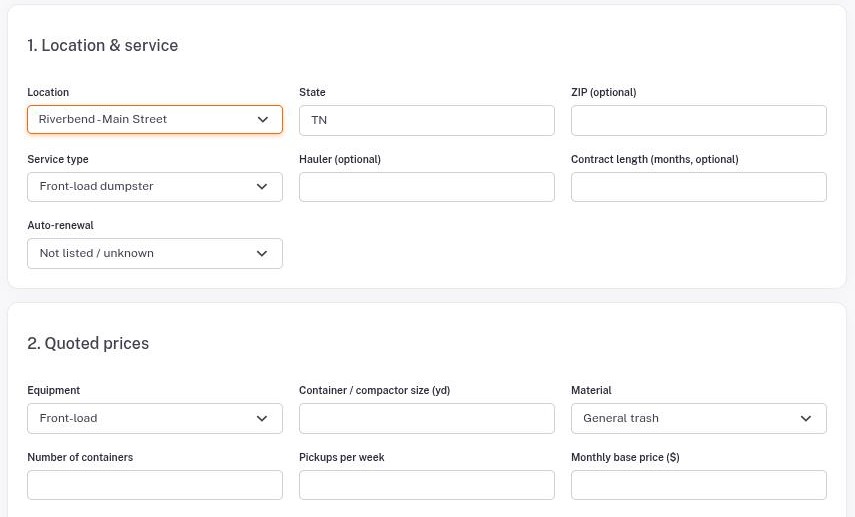
- Under Location & service, pick the location (or just enter the state and ZIP for a new site) and the service: front-load dumpster, roll-off or compactor.
- Under Quoted prices, enter what the hauler quoted. Dumpsters: size, how many, pickups a week and the monthly price. Roll-offs and compactors: haul charge, disposal per ton and rental.
- Enter the fuel/environmental fee if the quote lists one, and whether it has a written cap. If there's no fuel line, leave it blank.
- Check every field, check the confirm box and click Check this bid.
Reading the result
- True monthly cost: what you'd really pay each month, including fuel and fees.
- Target monthly price: the price to ask for, based on what similar businesses pay for the same service.
- Price per yard: the quote against the market range for the same container and pickups.
- Fuel fee: graded against what's typical. If the quote has no fuel line it says Not on this bid and adds the typical fuel rate, so the monthly total isn't understated. Ask the hauler for their fuel rate in writing.
- What to ask for: your talking points for the call with the hauler.
Comparisons use your state when Integra has enough data for the same service there, and the national figure when it doesn't. The page always says which.
Save the bid to the location to pull it up again when it's time to rebid.