
Reports turn your data into ready-to-share documents for one store, a brand or your whole company.
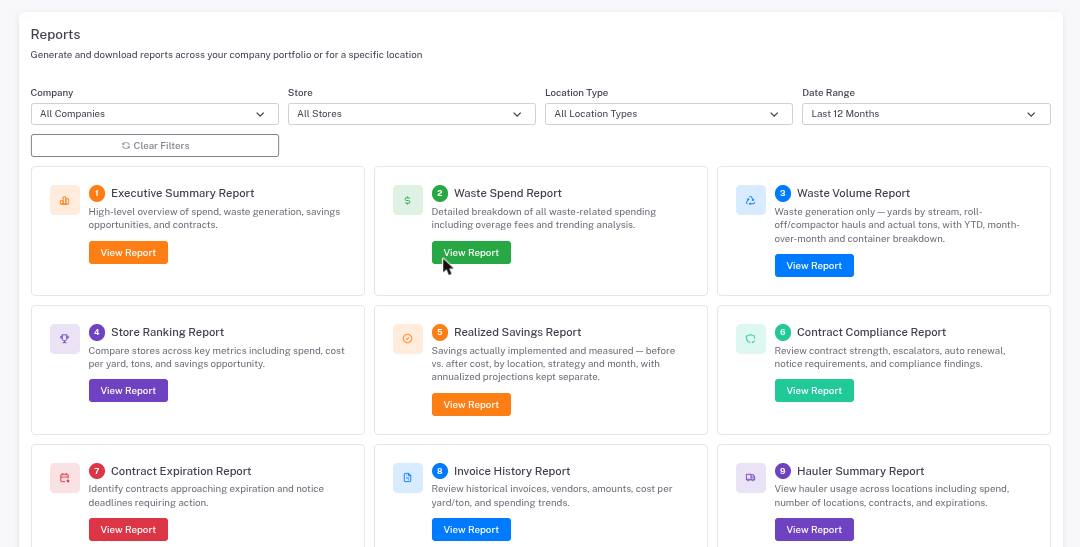
- Click Reports in the left menu (or open a store and click Reports to get its reports already filtered to that store).
- Pick the Company, Store, location type and Date Range.
- Click View Report on the report you want.
- Click Print / Save as PDF to keep or share it.
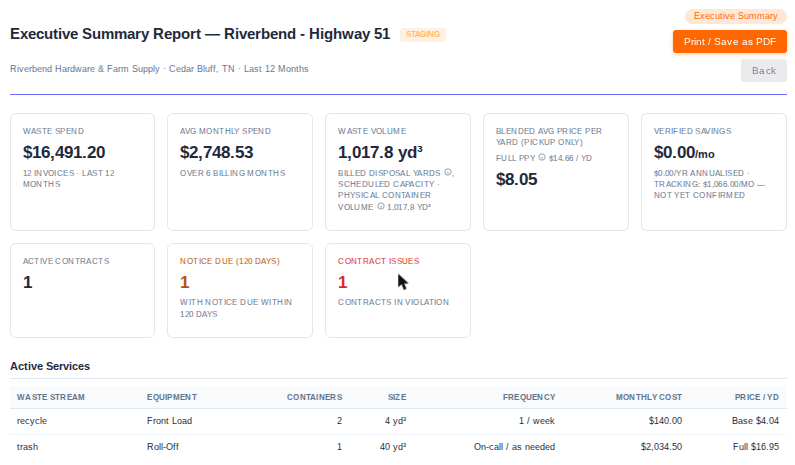
Which report to use
- Executive Summary: one page with spend, volume, price per yard, savings and contracts.
- Waste Spend: all spending, including overage fees and trends.
- Waste Volume: how much waste, by stream and container.
- Store Ranking: compares stores on spend, cost per yard and savings opportunity.
- Realized Savings: savings measured on your bills.
- Contract Compliance: agreement strength and compliance findings.
- Contract Expiration: agreements coming up for renewal and their notice deadlines.
- Invoice History: every bill, vendor and amount.
- Hauler Summary: spend, stores and contracts by hauler.
- Service Level: the services at each store.
- Bid Sheet: your stores and services, ready to send to haulers for bids (no pricing included).
- Diversion: what's kept out of the landfill (recycling, cardboard, organics, metal).
- Avoidable Charges: charges you can act on, like contamination, overages, extra pickups and late fees.